
Navisworks – Multiple Iterations and Locked Files
While working in Navisworks and you find that you are updating your models frequently, you have probably ran into the issue of having to close your Navisworks model in order to update your appended model. There is a quick way to get around this.
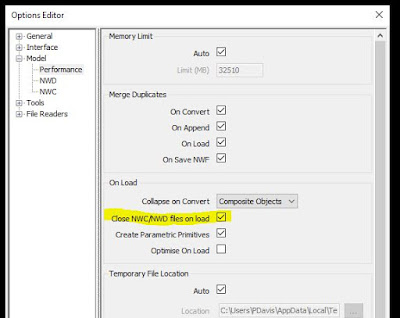
In the Options Editor > Model > Performance, make sure “Close NWC/NWD Files on Load” is checked. This will now allow you to overwrite NWC files without unloading them in your NWF file. So when you have an updated NWC that has overwritten the existing file, you just need to refresh Navisworks for the new model(s) to load.

About the author
Pat Davis founded VDC Experts after more than 25 years in BIM, VDC and reality capture. He wrote Introducing Autodesk Revit Architecture 2012 (Wiley) and co-authored earlier books in the Introducing Revit series.
Need existing conditions captured, a model built from scans, or Autodesk Forma set up?
Request a quoteBook a 30-minute call
Services: Laser Scanning · Scan-to-BIM · VDC and Forma Services · RTC360 Rental · Drone Capture